Original vs Compatible Laptop Batteries: Which One Should You Choose?

Why Choose RightCliq for Laptop Battery Replacement in Bangalore?
The most sophisticated type of work becomes a daily frustration with your failing laptop battery. Most times, when you go shopping for a battery, the first thing you see is an original battery and then a low-cost compatible battery, which complicates your decision more than it looks at first. Get straight to the point with this laptop battery replacement guide that takes you through a very common original vs compatible laptop batteries scenario that most buyers face right at the counter. You will learn the differences in safety, longevity, cost, and warranty between original batteries and third-party batteries. To help you decide which one is the best for your money, for your laptop, and how much risk you are willing to take.
Understanding Laptop Battery Types
Not all laptop batteries on the market are made equally. Some are manufactured by the laptop brand or its certified partner while others come from third parties for that specific laptop model.
This difference matters because build standards, firmware behavior, and price can vary greatly. Original batteries focus on consistency. You then have access to a fingerprint-optimal big battery, adding a layer of freedom, particularly for older models, where OEM stock is not so easily found. The distinction between original vs compatible laptop batteries is key to understanding what you are actually paying for before you buy. The latter two sections clarify both of these types.
How do I know my Battery is “Original” (OEM)?
Original laptop batteries are from a brand or authorized manufacturer. Some brands like HP and Dell rely on the big cell suppliers, but manufacture battery packs according to the OEM specifications.
To you, it translates to OEM batteries that are compatible with your laptop's voltage, connector configuration and firmware, hence the more accurate reading of your laptop's charge and reliable performance. This sets them apart from compatible batteries.
However, those OEM batteries aren't necessarily the highest-performance ones as companies still get the more mature designs in order that they can concentrate more on stability and safety rather than the maximum capacity.
What Makes a Compatible Laptop Battery?
A compatible battery is one that's built by someone other than the laptop brand - and you have got to be careful with those aftermarket ones. They might be a perfect match for your device, but quality can be all over the place. A good compatible battery will have been built using decent cells, proper safety circuits and a decent design. On the other hand you might be buying a dud - batteries that are put together with weak or second-hand cells can cause all sorts of problems.
- Look out for good aftermarket batteries that use reputable cells and decent safety features.
- Lower end batteries might be a bit dodgy, trying to pack in more energy than they're actually capable of and then wearing out quicker than they should.
- Even if a battery looks like it's high quality, how well it actually holds up depends on who made it, not just what it says on the label.
The Basics: Original vs Compatible Laptop Batteries
When you're looking at original vs compatible laptop batteries there are a few things that tend to leap out at you first: consistency, price and how well they actually fit and play nice with your laptop. Original batteries are built specifically to fit your laptop like a glove and communicate smoothly with it.
On the other hand, compatible batteries vary - some are great, some can be a disaster. A good third party battery can give you a battery life that's just as good as the original and save you some cash in the process. But if you get a bad one, you might end up with unstable readings or charging problems on your hands. Here's a bit more about the differences.
Build Quality, Design, and Materials
The build quality of a battery, and how it's been designed and made - has a big impact on how well it lasts. Original units are built to snug fitting OEM specs for all the bits that go into a battery - casing, cells and control circuits - which means they charge and discharge nice and smoothly and they can deal with heat okay.
compatible batteries, as you might expect, vary - some of them are built like a tank, with high quality cells and decent design, but others just can't be bothered to spend the extra cash on good parts, so they end up with batteries that hold less energy for a shorter amount of time.

Performance and Lifespan Comparison
Every day you will see performance in action. When selecting a battery, you will need to consider one which charges properly, has a strong holding power, and consistently releases energy without sudden fluctuations. The main of any laptop battery performance comparison is this.
Lifespan matters too. The lowest priced battery is not necessarily the best choice. You need one that will have longevity, particularly if you are using the laptop for years to come. This is because, when you are purchasing laptop batteries, you might be able to compare between original vs compatible laptop batteries, which means you will not have cause for concern about an expensive and short-lived replacement sooner rather than later.
Battery Life Expectancy and Charge Cycles
Most lithium-ion batteries have a lifespan of 300-500 cycles. Many OEM packs lose potency as they grow older, after 18 to 30 months.
Good third-party batteries are on par with these, cheap ones are not even close to meeting these expectations and tend to die around the 200 cycle mark. With life it is a question of quality, not price. Do not rely on mAh claims for actual value, check real watt-hours (Wh).
Issues of Compatibility and Real-World Performance
These results may vary based on the laptop that is being used. Original batteries provide smoother start and also provide accurate charge reporting. Yes, compatible ones can vary in whether they fit or if the bios warn of incompatibility and/or if they drop charge quickly.
- Good compatibility means stable runtime
- Poor compatibility causes charging issues
- Matching the part number matters most
Safety Concerns and Certifications at a Glance
When it comes to safety, it's not something to be taken lightly. Compared to a laptop battery, a battery with weak quality control can have hints of trouble, such as a swollen battery, overheating, and failure.
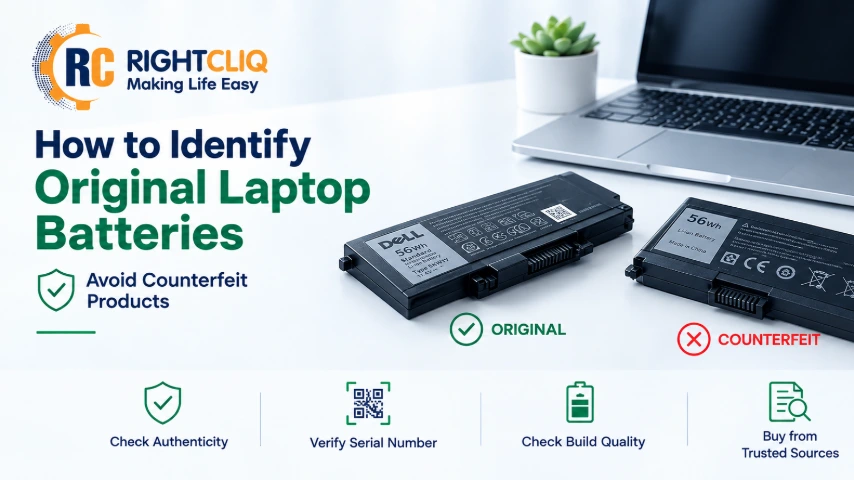
This is where certifications can be helpful. They are not a guarantee of perfection, but they can assure you that the battery has gone through critical testing. One telling comparison of the original vs compatible laptop batteries can be seen in the credentials held by products. When it comes to compatible laptop battery safety, make sure to concentrate on those tested laptop belts, while steering clear of offers that seem too great to be true.
Potential Risks with Compatible Batteries
However, if you are using a battery that is compatible with your laptop, there can be some associated risks, though the extent of risks will depend on the quality of the battery. A good pack, even if slightly more expensive, is not as much of a worry as a cheap pack because you can't trace the cells. Poor voltage control, poor thermal behavior and poor balancing within the pack are the largest safety hazards. These issues can cause erratic charging, over heating and early bulge.
- Mismatched voltage can affect charging behavior.
- Low-grade cells may overheat or fail early.
- Swelling can damage nearby laptop parts.
Industry Certifications and How to Spot Safe Options
When it comes to replacing your laptop battery, a valuable laptop battery replacement guide will always have at its center the safety checks. When selecting either OEM or third-party batteries, keep an eye out for clearly marked "recognized testing" and transport standards. Considering OEM compatible HP laptop batteries versus original laptop batteries or even just normal batteries, what should you seek? Check sure they have industry certifications and are visible, and correct fit, realistic capacity. Afterwards, verify the length of the warranty and how transparent the seller is.
- Look for UN38.3, IEC 62133, and UL 2054.
- Check Wh claims instead of trusting huge marketing numbers.
- Choose sellers that list model match, voltage, and return terms.
Buying Laptop Batteries in India: What to Know
As for the cost and availability of laptop batteries, this differs with each brand and model. Older laptops might not be available in official HP or Dell batteries, which means that many people end up purchasing batteries online. This is not necessarily bad – but simply purchased from a trusted vendor. Whether you're shopping on Amazon or a specialty retailer, pay attention to specifics, warranties and support, not flashy promises. The following tips will ensure that your purchase will be safer.
We have listed the key considerations in the table below to help you decide which ones best fit your purchase. Before buying a laptop battery read this short guide to learn what to look for and look out for, and how to select the battery to buy.
What to Check | What You Should Do | Why It Matters |
Battery Part Number | Match the exact battery part number. | Ensures proper compatibility. |
Voltage (V) | Match the original voltage exactly. | Prevents hardware damage. |
Capacity (Wh/mAh) | Choose the same or higher capacity. | Provides longer battery backup. |
Battery Type | Buy OEM or BIS-certified batteries. | Improves safety and reliability. |
Avoid Counterfeits | Avoid unbranded or fake batteries. | Reduces safety risks. |
Where to Buy | Buy from trusted sellers only. | Increases the chance of genuine parts. |
Warranty & Invoice | Get a warranty and GST invoice. | Simplifies future claims. |
The Complete Picture
The matrix of original vs compatible laptop battery is very important for the best results and safety of your laptop. While compatible batteries can be a cheaper option with minimal trade–offs in performance or compatibility, original batteries might offer reliability and better compatibility. Design/Construction and certification requirements should be a consideration in your choice. Understanding what points differ and how to assess your needs will enable you to make an astute choice that can ensure your laptop wades through easily. Remember that proper checking in the right battery means your device not only lives longer, it also is safe to use. Compare qualities prior to buying.